Paparan interaktif Qtenboard untuk perniagaan: meningkatkan produktiviti
2025-12-18
Paparan interaktif untuk perniagaan: mengubah kerjasama tempat kerja anda
Pengenalan
Di tempat kerja moden, paparan interaktif untuk perniagaan tidak lagi pilihan-mereka telah menjadi alat penting yang memacu kerja berpasukan, menyelaraskan aliran kerja, dan meningkatkan produktiviti di seluruh industri. Sama ada digunakan di pejabat korporat, pusat latihan, persekitaran kerjasama jauh, atau tetapan runcit, paparan interaktif untuk perniagaan mengubah bagaimana pasukan berkomunikasi, hadir, dan bekerjasama.
Di barisan hadapan transformasi ini, paparan interaktif Qtenboard untuk perniagaan menawarkan penyelesaian lengkap yang direka untuk kebolehpercayaan, fleksibiliti, dan kerjasama pintar. Disasarkan kepada organisasi yang ingin berkembang maju dalam era digital, Qtenboard menyampaikan teknologi interaktif canggih dengan ciri-ciri berkuasa AI, alat pengurusan jauh, dan konfigurasi perkakasan dan perisian yang disesuaikan.
Panduan ini akan meneroka ciri-ciri utama, faedah, aplikasi, dan trend masa depan dalam paparan interaktif untuk perniagaan, dengan tumpuan khusus tentang bagaimana penyelesaian Qtenboard memperkasakan tempat kerja moden dan meningkatkan kecekapan operasi.
Apakah paparan interaktif untuk perniagaan?
Paparan interaktif untuk perniagaan adalah sistem perkakasan canggih yang mengintegrasikan teknologi paparan definisi tinggi dengan interaksi sentuhan responsif, membolehkan pengguna terlibat secara langsung dengan kandungan digital dalam masa nyata. Tidak seperti monitor pasif tradisional, sistem interaktif ini membolehkan pengguna menyentuh, menulis, anotasi, dan memanipulasi kandungan secara langsung pada skrin.
Paparan interaktif terbaik untuk perniagaan menggabungkan perkakasan canggih dan perisian pintar untuk menyokong aliran kerja kolaboratif, persembahan dinamik, dan penglibatan masa nyata. Paparan interaktif di Qtenboard, sebagai contoh, termasuk:
Panel Multi-sentuh yang menyokong 10 titik sentuhan serentak
Resolusi 4K UHD untuk visual yang terperinci dan terperinci
Alat kerjasama berkuasa AI termasuk ucapan-teks dan ringkasan mesyuarat
Pengurusan jauh melalui DMS untuk kawalan berpusat
Papan putih dan aplikasi kandungan disesuaikan
Dengan memudahkan interaksi langsung dengan kandungan digital, paparan interaktif untuk pasukan bantuan perniagaan bekerjasama dengan lebih berkesan, membuat keputusan lebih cepat, dan berkongsi maklumat dengan lancar di seluruh jabatan atau lokasi.
Komponen utama paparan interaktif untuk perniagaan
Untuk memahami apa yang membuat paparan interaktif untuk perniagaan begitu berharga, ia berguna untuk memecahkan komponen teknikal teras mereka:
Panel skrin sentuhPanel skrin sentuh adalah jantung mana-mana paparan interaktif untuk perniagaan. Paparan interaktif Qtenboard menggunakan panel sentuh kapasitif yang sangat responsif dengan jarak pengaktifan ultra rendah (hampir 0.5mm), yang membolehkan pengesanan input yang tepat sama ada menggunakan jari, stylus, atau sarung tangan. Panel sentuh ini menyokong interaksi berbilang pengguna, membolehkan pelbagai peserta menulis dan anotasi secara serentak.
Teknologi paparan definisi tinggiPaparan interaktif Qtenboard untuk kegunaan perniagaan panel LCD/LED premium dengan resolusi 4K UHD (3840 × 2160), memastikan warna-warna cerah, teks yang jelas, dan visual tajam walaupun di bilik mesyuarat besar atau bilik darjah. Resolusi tinggi sangat sesuai untuk persembahan terperinci, visualisasi data, dan sesi papan putih kolaboratif.
Pemproses dan perisian terbenamPemproses bersepadu untuk memacu sistem interaktif, menjalankan sistem operasi terbenam seperti Android, Windows OPS atau konfigurasi dwi OS. Paparan interaktif Qtenboard termasuk rangka kerja perisian yang kuat yang menyokong alat kerjasama masa nyata, sambungan awan, aplikasi papan putih, dan integrasi pihak ketiga yang meningkatkan produktiviti.
Pilihan sambunganPaparan interaktif untuk perniagaan mesti mengintegrasikan dengan lancar dengan infrastruktur IT yang sedia ada. Qtenboard menyokong sambungan serba boleh termasuk HDMI, USB, LAN, Bluetooth, wi-fi, dan pencerminan skrin tanpa wayar. Ini memastikan bahawa komputer riba, peranti mudah alih, dan perkhidmatan awan boleh menyambung dengan cepat dan boleh dipercayai.
Sensor pilihan dan kameraModel Qtenboard lanjutan termasuk kamera terbina dalam dan sensor untuk menyokong persidangan video, kawalan isyarat, dan interaksi suara. Ciri-ciri ini memperluaskan utiliti paparan interaktif untuk perniagaan dalam persekitaran kerja hibrid di mana penyertaan jauh dan penglibatan masa nyata adalah penting.
Faedah atas paparan interaktif untuk perniagaan
1. Meningkatkan kerjasama dan penglibatan pasukan
Sistem interaktif di Qtenboard membenarkan beberapa pengguna untuk menarik, anotasi, dan mengedit kandungan dalam masa nyata. Keupayaan pelbagai sentuhan ini mengubah mesyuarat dan sesi brainstorming ke dalam pengalaman yang sangat interaktif di mana setiap suara dapat menyumbang secara visual dan dinamik.
2. Aliran kerja yang diselaraskan dan perkongsian maklumat
Paparan interaktif menjadi hab pusat untuk berkongsi kandungan. Integrasi dengan platform penyimpanan awan seperti OneDrive dan Google Drive memastikan fail boleh didapati dalam masa nyata, menghapuskan kelewatan dalam akses data dan meningkatkan responsif operasi.
3. Peningkatan kecekapan mesyuarat
Alat papan putih terbina dalam dan ciri-ciri anotasi membolehkan peserta berinteraksi secara langsung dengan kandungan-menandakan dokumen, menonjolkan mata utama, dan menyimpan nota kongsi dengan serta-merta. Alat pemindahan fail cepat mempercepatkan aliran kerja mesyuarat.
4. Kerjasama jauh dan sokongan kerja hibrid
Paparan Qtenboard mengintegrasikan dengan platform persidangan video, yang membolehkan pasukan yang diedarkan berinteraksi dengan kandungan yang dikongsi dan menyumbang sama rata tanpa mengira lokasi-penting untuk model kerja hibrid moden.
5. Dipertingkatkan visualisasi Data
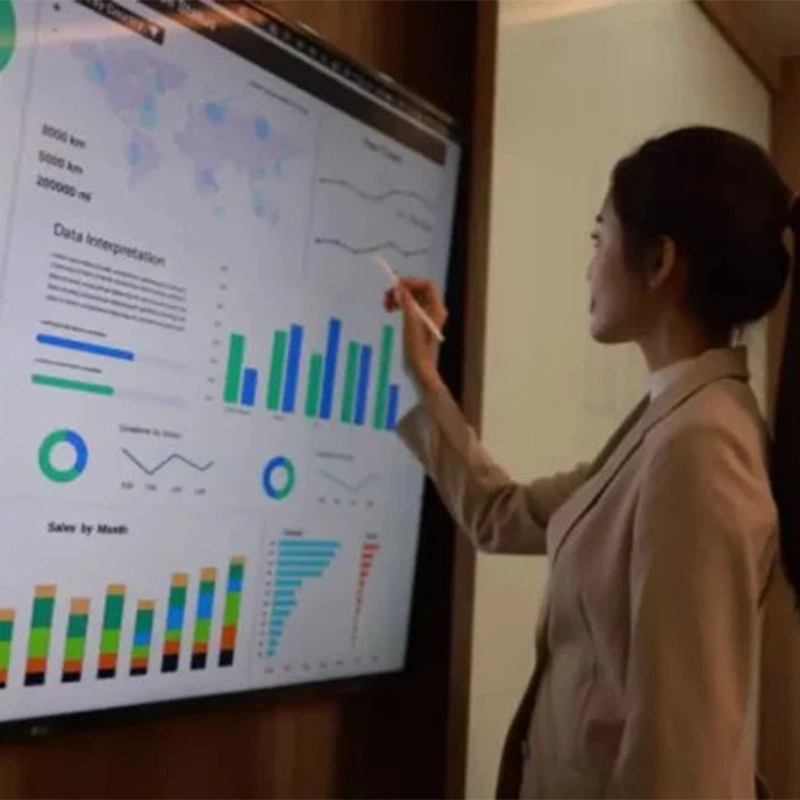
Pengguna boleh mengezum masuk pada titik data tertentu, menyesuaikan parameter, dan melibatkan diri dengan perwakilan visual dinamik perisikan perniagaan-menyokong mesyuarat yang didorong oleh data dan membuat keputusan yang tepat.
Aplikasi serba boleh memaparkan interaktif untuk perniagaan
Mesyuarat korporat dan persembahanIdeal untuk persembahan perniagaan di mana interaksi masa nyata adalah kritikal. Pembentang boleh anotasi slaid, menekankan perkara-perkara utama, dan menavigasi kerjasama fluidly-meningkatkan kandungan semasa sesi membuat keputusan.
Latihan dan bengkelUntuk latihan korporat, paparan interaktif meningkatkan penglibatan dengan menggabungkan video, penjelasan papan putih, dan interaksi tangan. Peserta boleh berinteraksi secara langsung dengan bahan latihan dan bekerjasama dengan tugas menyelesaikan masalah.
Penglibatan pelanggan dalam persekitaran runcitKuasa kiosk interaktif untuk menyemak imbas produk, pemeriksaan inventori atau transaksi jualan. Sistem interaktif Qtenboard menyokong interaksi sentuhan kaya yang mendorong penglibatan dan penukaran.
Papan pemuka pengurusan projekMenjadi papan pemuka pusat untuk menjejaki kemajuan projek, menggambarkan garis masa, dan menyelaraskan tugas. Alat dinamik seperti carta Gantt dan papan Kanban membantu pasukan tetap sejajar dan responsif.
Model paparan interaktif teratas untuk perniagaan (gambaran keseluruhan Neutral jenama)
Untuk membantu anda membandingkan, berikut adalah beberapa paparan interaktif yang sangat dihormati untuk penyelesaian perniagaan pada masa ini di pasaran:
Samsung Flip 2: Paparan interaktif 4K 55 inci dengan input sentuhan responsif dan alat anotasi masa nyata. Ideal untuk persekitaran kolaboratif dan pengurusan kandungan yang mudah.
Microsoft Surface Hub 2S: Terdapat dalam model 50 inci dan 85 inci, dengan sokongan multi-touch top-tier dan integrasi yang kuat dengan Microsoft 365 dan pasukan. Hebat untuk ruang kerja hibrid.
Lembaga Aquos Sharp PN-L803C: Penyelesaian multi-sentuh 80 inci dengan sentuhan inframerah dan alat kerjasama termasuk pemutus tanpa wayar dan keupayaan dwi-skrin.
BenQ RP653K: Paparan interaktif 4K 65 inci dengan permukaan anti-silau dan sokongan sentuhan 10 mata, OS Android terbina dalam, dan perkongsian skrin tanpa wayar, sesuai untuk bilik persidangan.
Paparan interaktif Qtenboard untuk perniagaan: Kejuruteraan untuk kes penggunaan perniagaan dengan perkakasan yang mantap, alat AI yang kuat, dan keupayaan pengurusan jauh profesional-sepenuhnya disesuaikan untuk integrasi penjenamaan dan aliran kerja.
Bagaimana untuk memilih paparan interaktif yang betul untuk perniagaan
Memilih paparan interaktif terbaik untuk perniagaan bergantung kepada beberapa pertimbangan utama:
Memahami keperluan perniagaan anda Pertimbangkan kes penggunaan utama-adakah anda menggunakan paparan untuk mesyuarat, latihan, penglibatan pelanggan, atau kerjasama projek? Menjelaskan keperluan teras anda akan membimbing proses pemilihan anda.
Bajet dan jumlah kos pemilikan Paparan interaktif berbeza-beza mengikut harga bergantung kepada saiz, resolusi, dan set ciri. Akaun untuk kos jangka panjang seperti langganan perisian, penyelenggaraan, jaminan, dan alat pengurusan jauh.
Keserasian sistem Pastikan paparan mengintegrasikan dengan baik dengan perisian dan perkakasan anda yang sedia ada, seperti Microsoft Office, ruang kerja Google, platform persidangan video, dan sistem keselamatan korporat.
Bolehan dan fleksibiliti Pilih paparan yang menyokong skala masa depan, sama ada melalui ciri modular atau keserasian dengan skrin tambahan dan peranti.
Ciri-ciri masa depan-bukti Cari paparan interaktif dengan AI, integrasi awan, dan pengurusan jauh untuk masa depan-bukti pelaburan anda sebagai teknologi berkembang.
Trend masa depan dalam paparan interaktif untuk perniagaan (2025 dan seterusnya)
Landskap paparan interaktif untuk perniagaan semakin maju. Melihat ke hadapan, trend utama ini akan membentuk masa depan:
Teknologi sentuhan dan isyarat lanjutan Paparan interaktif pada masa hadapan adalah mungkin untuk menerima pakai sentuhan 3D, kawalan isyarat dan interaksi tekanan sensitif, membolehkan penglibatan pengguna yang lebih semula jadi dan nuanced.
Integrasi AI yang lebih mendalam AI akan terus meningkatkan alat kerjasama dengan analisis ramalan, cadangan kandungan peribadi, terjemahan bahasa masa nyata, dan automasi aliran kerja.
Kerjasama awan lancar Integrasi awan yang dipertingkatkan akan membolehkan pasukan bekerjasama dengan dokumen yang dikongsi, menyegerakkan perubahan serta-merta, dan mengakses fail dari mana-mana sahaja-memastikan bahawa kedua-dua pekerja di pejabat dan jauh tetap sejajar.
Mudah alih dan penggunaan fleksibel Paparan interaktif mudah alih dengan reka bentuk ringan dan kuasa bateri pilihan akan menjadi lebih lazim, menjadikannya lebih mudah untuk menggunakan teknologi interaktif di pejabat satelit, pameran perdagangan, atau ruang kerja dinamik.
Realiti diperkukuhkan (AR) dan pengalaman yang mendalam Integrasi AR dengan paparan interaktif akan menyediakan alat latihan dan visualisasi yang mendalam, terutamanya berharga dalam reka bentuk, kejuruteraan, dan aliran kerja pembangunan produk.
Mengapa memilih Qtenboard untuk paparan interaktif anda untuk perniagaan
OEM/ODM penyesuaianKetahanan 50,000 jamAlat berkuasa AIPengurusan jauh DMSPapan putih kerjasamaIntegrasi fail awanKunci keselamatan perusahaanSokongan berbilang pengguna
Penyelesaian Qtenboard direka bentuk untuk meningkatkan kerjasama, produktiviti, dan integrasi aliran kerja, menjadikannya pilihan yang boleh dipercayai untuk organisasi yang mencari paparan interaktif yang mantap untuk perniagaan.
Kesimpulan
Paparan interaktif untuk perniagaan mengubah bagaimana organisasi berkomunikasi, bekerjasama, dan berinovasi. Dari bilik tidur dan bilik darjah ke persekitaran runcit dan bilik kawalan perindustrian, penyelesaian ini memacu penglibatan, menyelaraskan aliran kerja, dan meningkatkan proses membuat keputusan.
Paparan interaktif Qtenboard untuk perniagaan menawarkan suite komprehensif ciri-dari skrin multi-touch 4K dan alat produktiviti berkuasa AI untuk pengurusan jauh dan interaktiviti papan putih-yang memperkasakan pasukan anda untuk bekerja lebih bijak, lebih cepat, dan lebih bersama-sama. Dalam dunia di mana transformasi digital adalah kritikal, melabur dalam paparan interaktif berkualiti untuk perniagaan seperti Qtenboard boleh membuat semua perbezaan dalam memajukan matlamat organisasi anda.
Klik untuk membaca butiran produk dan belajar tentang ciri-ciri fungsinya dan prestasi sebenar.




 MAY
MAY
 EN
EN  TH
TH  CHT
CHT  ID
ID  BUR
BUR  FIL
FIL  HKM
HKM  LAO
LAO  SIN
SIN  VIE
VIE